Zenventory was built for 3PLs. Run inventory, orders, shipping, and client billing from one platform. No bolt-on apps, no spreadsheet workarounds.
Trusted by over 1,200+ companies
What is a WMS for 3PLs? 3PL warehouse management software (WMS) is the digital backbone a logistics business runs on, directing every daily workflow from receiving and picking to shipping and automated client billing in one place.
Zenventory is built specifically for 3PLs. With multi client inventory control, automated billing, and built in shipping under one roof, you can stop stitching together fragmented software and start running a leaner, meaner operation.
NO DISCONNECTED TOOLS. NO GROWTH PENALTIES.
Everything your 3PL needs in one platform
Zenventory replaces your disconnected tools with one system built for how a 3PL actually operates.
Rate-shop USPS, UPS, FedEx, Amazon, DHL e-commerce(and more) and print labels without opening a third-party app. Shipping lives where your inventory and orders do, so tracking and status stay in sync.
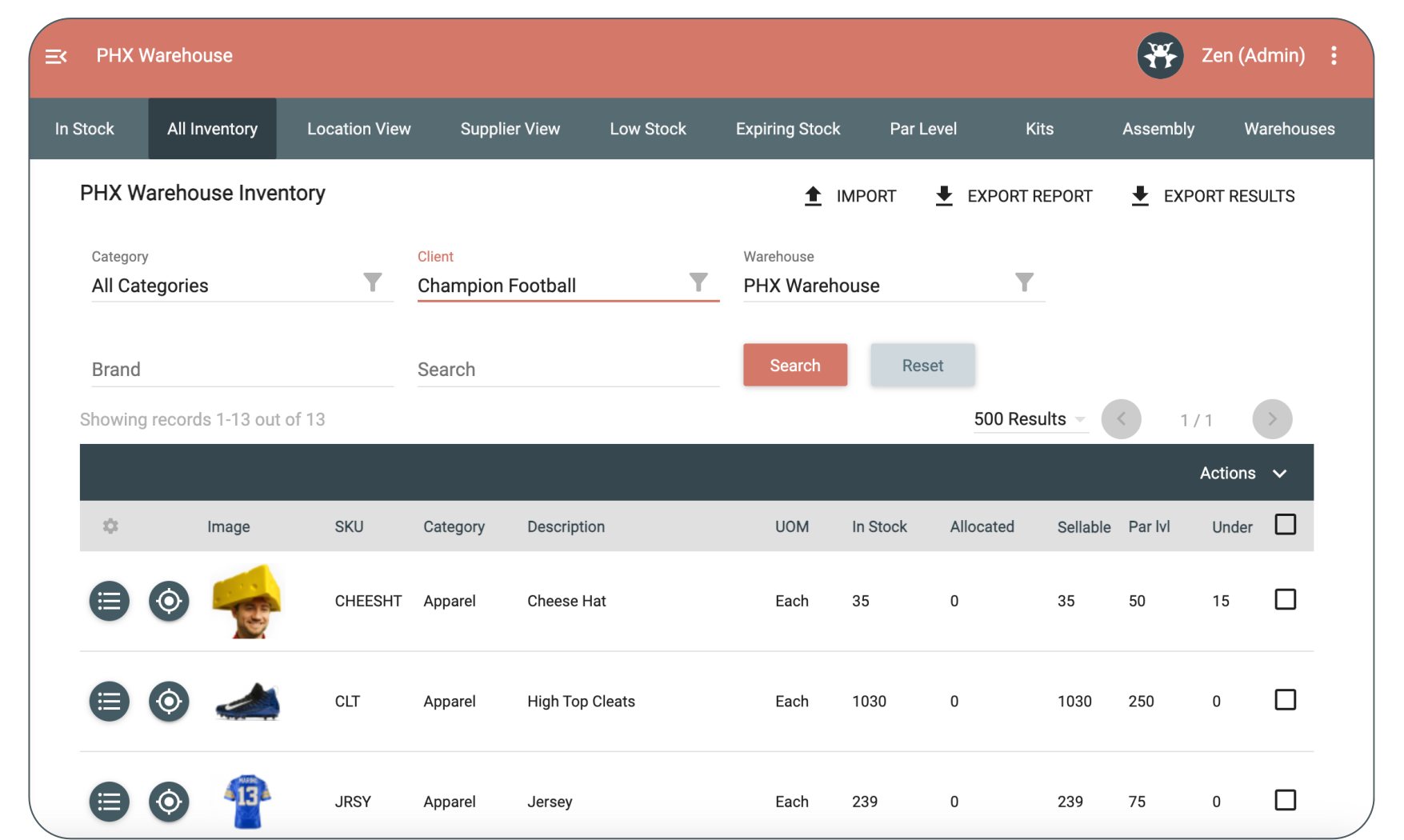
Keep every client separate and every order accurate. Zenventory delivers high-level inventory control without the high-level headache.
With Zenventory's 3PL WMS you can:
Segregate inventory by client
Maintain separate SKU catalogs
Apply client-specific billing rules
Control user access by client
Generate client-level reporting
And real-time inventory visibility across multiple warehouses, clients, platforms, and locations.
50%
Faster receiving
99%
Inventory accuracy
60+
Hours saved a week
Plus:
Automated tracking for lot numbers and expirations at the client level
Organized, secure workflows and data without the overhead of multiple platforms
Direct connections to your clients' stores, including Amazon, Walmart, and Shopify
Once every client's stock is accurate, the next job is getting paid for the work. That's where automated billing comes in ...
BETTER BILLING WITH ZENVENTORY
Automate 3PL billing and margin protection
Zenventory ties client billing directly to the warehouse activities you already track, so the charges are captured as the work happens and the numbers are ready when billing day comes.
Billing rules
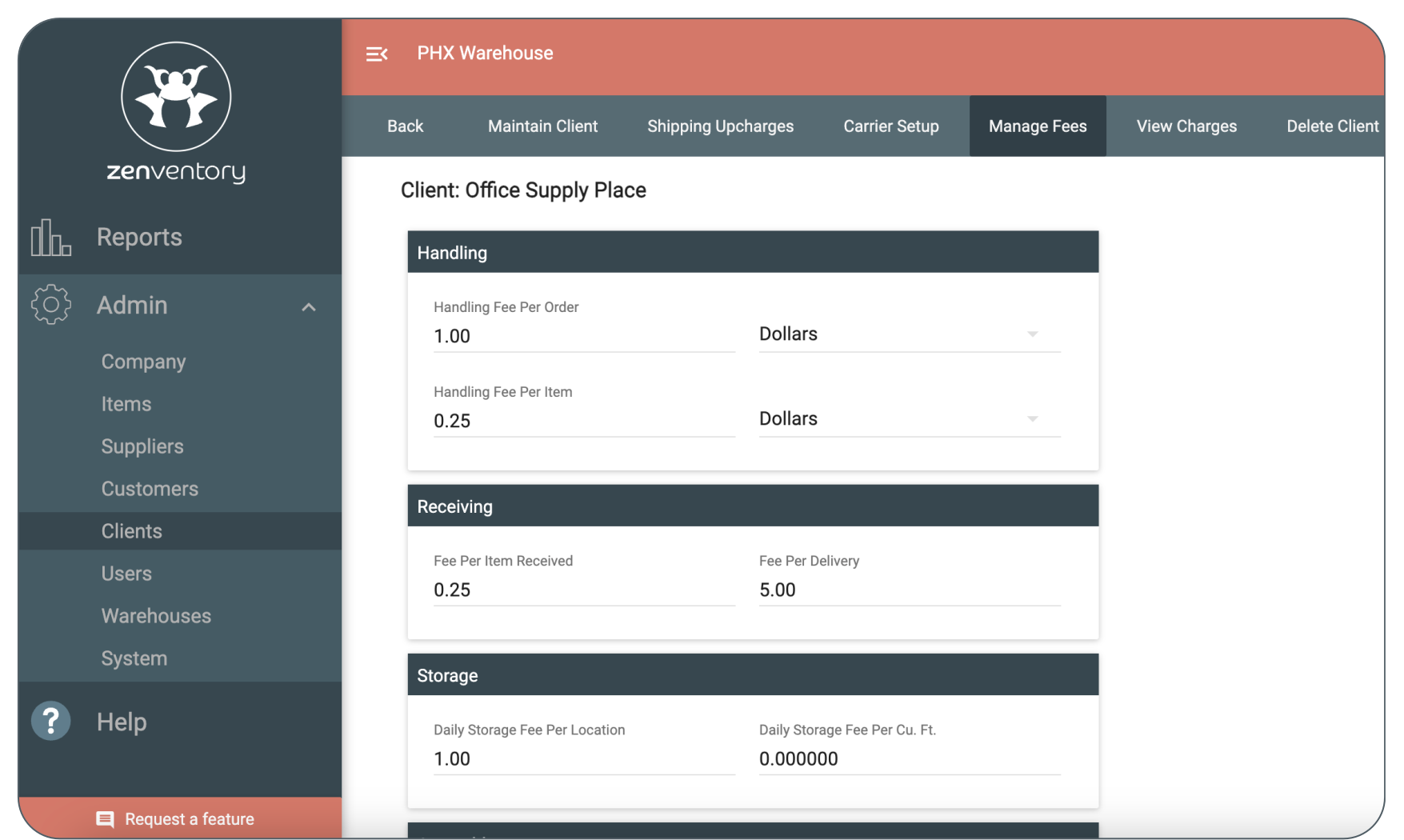
Set fees per client, or build one fee set and copy it across clients to save setup time. Automate billing with flexible rules for:
Shipping upcharges by weight range (flat fee or percentage)
Handling fees per order or per item (single rate or tiered pricing based on item quantities)
Receiving fees per order or per item
Storage fees based on inventory in storage
Assembly and other value-added services
Miscellaneous service charges that don't fit standard categories
As orders are received, picked, packed, and shipped, Zenventory applies the correct fees automatically, so you spend less time on manual invoicing and avoid missed charges or underbilling.
From captured charges to a sent invoice
Zenventory captures and totals every billable charge.
So, when the billing period closes, you can:
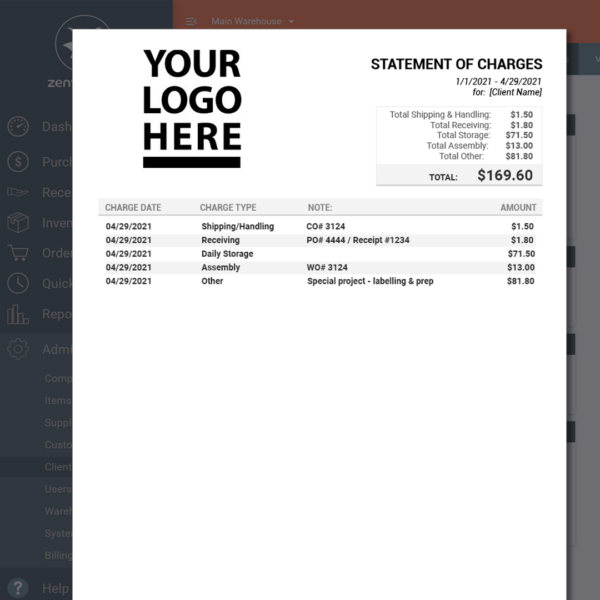
Pull a downloadable statement of charges by client and date range, in CSV or PDF
Sync the data to QuickBooks Online, so there is no export-and-re-enter step
Hand clients a clear, itemized statement they can reconcile against their own records
Revenue reporting
Zenventory's clear billing and client charge reporting also lets you:
Track revenue and fees by client
See how much you're earning from handling, receiving, storage, and services
Drill into charges at the order or receipt level when needed
When billing is driven by system captured warehouse activity and configurable rules, revenue becomes more predictable, auditable, and easier to defend with your clients.
Accurate billing also means fewer client disputes. Give clients their own view, and the questions stop before they reach your inbox ...
REDUCE CLIENT INQUIRIES BY 70%
White-label client portal for 3PLs
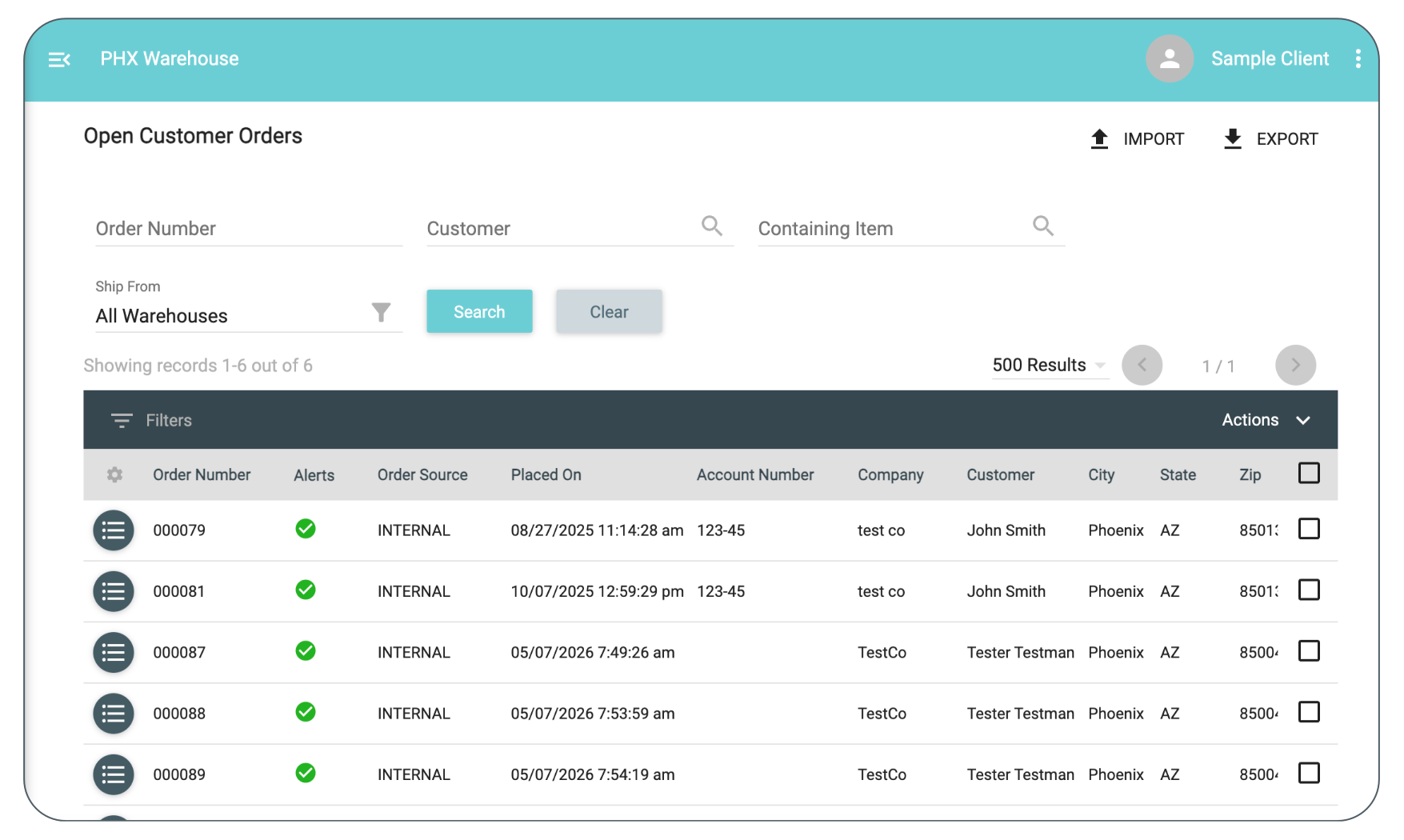
Reduce inbound inquiries and give your team more time to focus on revenue-driving fulfillment. Zenventory’s white-label client portal empowers clients with:
Real-time inventory levels
Order and fulfillment status
Self-service reporting, and more!
With clients self-serving and billing handled, the last job is getting orders out the door, fast and cheap ...
SHIP WITH CONFIDENCE
Integrated shipping and fulfillment
Zenventory gives your team the tools to move faster while making sure every box that leaves your dock is 100% correct. Here's what that looks like:
Accelerate workflows with high-velocity picking and packing
Scan-based verification for 100% order integrity
Automated stock logic that removes the manual heavy lifting
Print labels in bulk once an order is picked and verified
INCREASE YOUR TRANSPORTATION MARGIN
Built-in discounted shipping (no extra tools required)
Zenventory helps increase your transportation margin by helping you become more profitable.
Ship smarter, save more, and simplify your process:
Multi-carrier automated rate shopping
Diversify your carrier portfolio instantly
Full visibility with centralized billing and reconciled invoices
We also handle your shipping claims so your team stays focused on fulfillment
21%
Avg off your current discounted rates
10+
Shipping carriers
95%+
On-time delivery rate
Get all your questions answered. Book a meeting with one of our product experts today!
Ship on a client's or partner's own carrier account instead of your house account. Zenventory accommodates clients who've set up their own carrier contracts, drops the manual account tracking, and keeps clear reporting on which shipments were billed to third-party accounts versus your own.
Special item type support
Lot numbersandexpiration daterecords are captured and tracked in Zenventory during the receiving process for full traceability and compliance.
Manage inventory across all of your warehouseswith one system. Use location mapping to pinpoint stock in larger warehouses. Print location barcodes to speedup put-away and picking. Automate cycle counting (never shut down a warehouse to count inventory again!)
Streamline pick & pack
Electronically pick from the web or our companion mobile app, or use a custom printed pick list. Use group-based picking for large warehouses to allow staff to customize batches of items to pick based on type or location for order consolidation. Or, pick an order by order.
Dynamic order tags
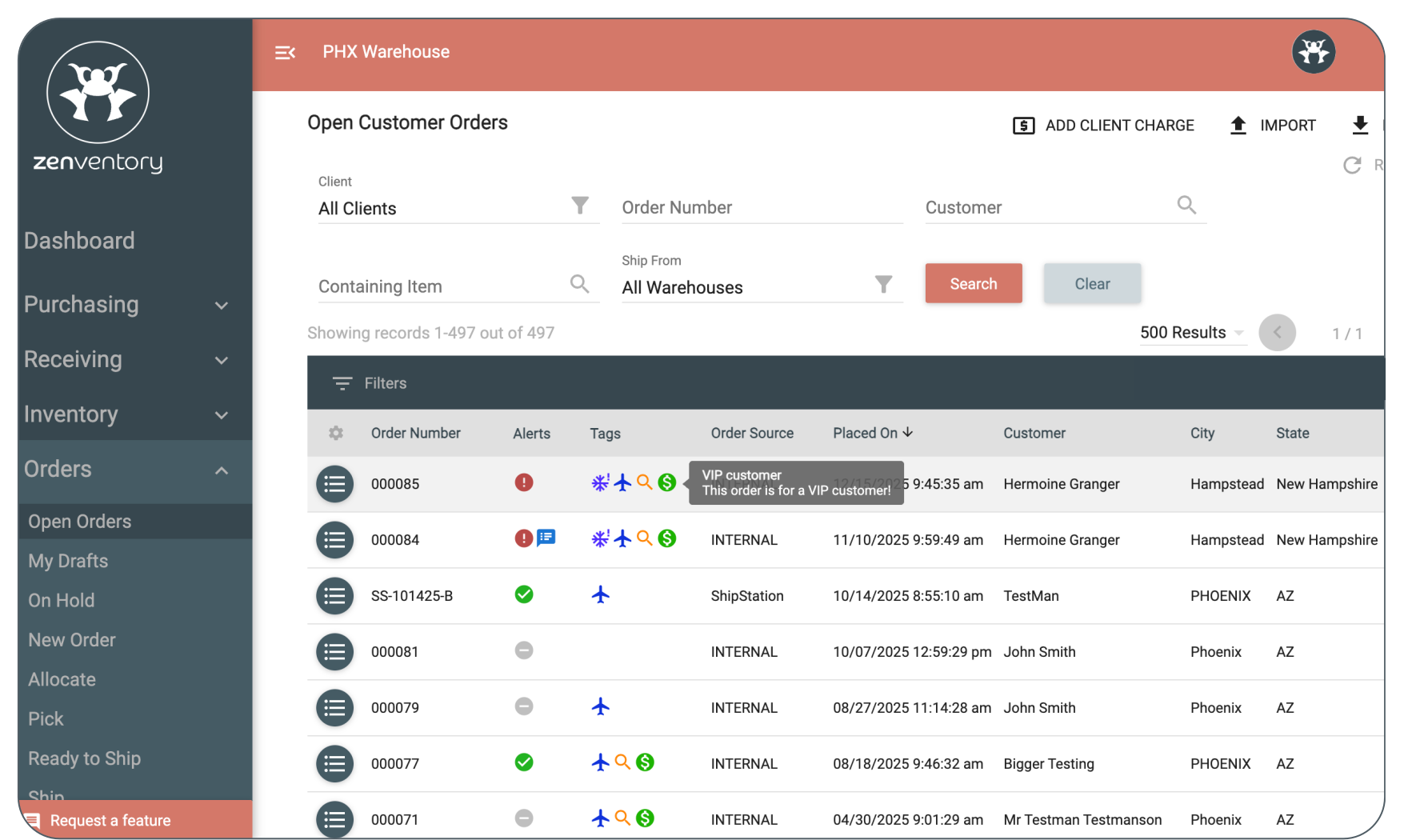
Make it so that you and your team can quickly identify yourorder tagswith icons, labels, and colors. Set up automation rules to apply the tags automatically or add them manually at any time in batches.
Cross-dock fulfillment
Eliminate extra steps withcross-dock workflowsthat allow you to link incoming purchase orders directly to outgoing client shipments.
Returns management
Process returns without wrecking your inventory counts. Receive returned items against the original order, restock or quarantine them, and keep the activity on record so returns show up in client reporting and billing like any other warehouse task.
Powerful API
Zenventory integrates with all major marketplaces and supports custom connections throughour powerful API. Use our API to automatically download orders from all your clients' channels.
Your warehouse team. Untethered.
Empower your team with ourfree companion mobile app(Android). Perform barcode scanning, cycle counting, order picking, and more.
Unlimited warehouse users
As your fulfillment team grows, don't worry about extra fees. Whether your warehouse team is 5 people or 500 people,Zenventory's price stays the same.
“Zenventory has been instrumental in our mission to provide the most modern tools to our customers.” – Complete Fulfillment & Distribution, 3PL
Built for small-to-medium-sized 3PLs, not enterprises
Enterprise WMS platforms were designed for operations with dedicated IT teams, six-figure implementation budgets, and 18-month go-live timelines. Most small-to-medium-sized 3PLs do not have any of those things and should not have to pay for them.
Zenventory is built for the 3PL owner who is also the warehouse manager, the billing department, and the sales team. That means a system you can actually implement yourself, transparent pricing that starts under $500 per month, and features that are standard because they ... should be standard.
No per-module fees. No paying extra for the mobile app. No implementation consultant required.
TRANSPARENT PRICING. NO CONTRACTS.
Transparent 3PL WMS pricing
As your 3PL grows, operations get more complicated. But your software bill shouldn't punish you for scaling. We believe in radical transparency: No hidden fees and no contracts.
Every Zenventory plan comes with:
Unlimited users (yes, really)
Unlimited clients
Unlimited products and integrations
Unlimited expert support from real live humans, with hold times under one minute
3PL warehouse management software is a platform 3PLs use to manage inventory, orders, and fulfillment across multiple clients. Zenventory is an all-in-one WMS built for SMB 3PLs, combining multi-client inventory, automated billing, and built-in shipping in one system, so you never have to connect separate tools.
Unlike generic inventory software designed for a single brand or retailer, a 3PL WMS is built around the reality of running a shared warehouse for multiple clients at once. That means separate inventory records per client, automated billing for storage and handling, and a client portal so your customers can check their own order status without calling you.
Why do 3PLs outgrow generic inventory tools?
Most 3PLs start with a patchwork: a basic WMS for inventory, a shipping app bolted on the side, and a spreadsheet for billing. It works until it does not.
Here is where it breaks down:
Billing reconciled in spreadsheets every month. Storage fees, accessorials, and handling charges get entered by hand, missed, or undercharged. By the time you catch it, the invoice is already out.
A separate shipping app that does not talk to the WMS. You are toggling between two systems to print a label, checking tracking in a third, and wondering why order status is always a step behind.
"Where is my order" emails because clients have no visibility. Every inbound call is time your team spends answering a question the software should answer automatically.
Carrier blame with no audit trail to settle it. When a shipment goes missing, you need a timestamped scan history to prove your warehouse did its job. Without it, you absorb the cost.
These are not edge cases. They are the ordinary cost of running a 3PL on tools that were never built for one.
How does Zenventory separate data by fulfillment client?
All client data that flows into Zenventory will get unique identifiers to let the system know which particular client it belongs to. As a 3PL operator, you'll have a global, birds-eye view of all data that you manage, but you can also filter things by client in order to drill down easily when needed. And clients will never be able to access each other's data; they'll only be able to see their own (and only if you choose to grant them portal access).
What can my clients do in the portal?
The goal is self-service capability: Clients can conveniently do what they need to do in Zenventory, so they can skip calling/emailing you for routine tasks or real-time visibility to their data. Client portal access is highly customizable per client, but a client user with maximum access would be able to manage their own SKU catalog, set up their own kits/bundles, see order fulfillment status/create manual orders, manage their list of suppliers, create POs/inbound orders, and even manage their own integration setup.
Does Zenventory help with client billing?
Yes! Zenventory supports the creation of unique billing scenarios per client, including shipping upcharges, handling fees, receiving fees, storage fees, assembly fees, and even customized miscellaneous charges. You can set these manually in the interface or let the system do it using our powerful automation rules. Once you set up the rules, the system will auto-calculate charges based on activity in the system and provide a handy statement in digital or PDF format for you & your clients.
How does automated 3PL billing work?
As your warehouse staff receive shipments, pick orders, store inventory, and process returns, Zenventory records each event and applies your client-specific rate card. When the billing period closes, you pull a downloadable statement of charges by client and date range, or sync the data to QuickBooks Online.
How does Zenventory's cross-dock feature benefit my 3PL operations?
This feature saves time and minimizes errors by automatically transferring the inbound purchase order details to the outbound customer order, ensuring both orders match and speeding up prep and shipment to destinations like Amazon warehouses.
How is 3PL WMS different from regular warehouse software?
A 3PL WMS must support multiple clients, complex billing rules, warehouse transfers, client portals, and revenue reporting (capabilities that standard retail WMS platforms typically lack).
How do my clients get their orders into Zenventory?
Zenventory offers direct integrations to all major marketplaces, such as Shopify, Amazon, and eBay. If you use ShipStation to consolidate order integrations, our robust integration to ShipStation is fully 3PL-ready and allows assignment of ShipStation stores to your Zenventory clients, so orders will always land in the right place. Need more options? We offer a well-documented REST API, an easy-to-use CSV import tool, and an option in the client portal for them to create manual orders directly in Zenventory.
Do I need a separate shipping system?
Nope! You don't need a separate shipping system.
Our shipping engine, ZenShip, is a full shipping engine that rivals the best standalone systems.
Also, when you ship with Zenventory, you get access to:
Multi-carrier support (including USPS, UPS, FedEx, DHL eCommerce, and Canada Post) for in app label printing.
Built-in rate shopping that automatically surfaces the cheapest shipping option available - no extra clicks required.
High-velocity batch shipping that not only speeds up fulfillment, but also notifies you if a better shipping rate is available.
Centralized billing, audit-ready carrier invoice reconciliation, and integrated claims management, giving you oversight and control from one spot.
Unlimited users, no hidden fees, and enterprise-grade functionality that's been shaped for both e-commerce and 3PL operations.
Can I white-label the interface?
Yes! You can add your own company branding elements to the interface to give it a unique look & feel. Clients will see your logo & color scheme when they log in rather than Zenventory's, and help requests from your clients in our interface will be redirected to your own support team's email or ticketing system.
What steps are required to cross-dock a purchase order with a customer order in Zenventory?
Here are the steps to cross-dock a purchase order with a customer order in Zenventory:
First, create a new purchase order in Zenventory
On the final creation screen, check the box labeled "Cross-Dock this PO"
Click the orange "Confirm" button to finalize
You'll be redirected to create the linked customer order, with all items and quantities already copied over
Last step is to enter the Customer information and finalize the Customer Order
And voila! That's it!
How much does 3PL warehouse management software cost?
Zenventory starts at $249/month for new customers (standard rate: $499/month), which includes up to 10,000 shipments, 1 warehouse, and unlimited clients, users, products, and integrations. The Growth plan is $399/month for new customers (standard: $799/month) and covers up to 50,000 shipments across 3 warehouses.
Can I bill shipping to a client's own carrier account?
Yes. Third-party shipment billing lets you ship on a client's or partner's carrier account instead of your own, which suits clients who've negotiated their own carrier contracts. Zenventory keeps clean reporting on which shipments were billed to an external account versus your house account, so nothing gets muddled at reconciliation.

.svg "Zenventory WMS - 3PL Focused-Features (1)")



.png?width=100&height=100&name=Customer%20Logos%20(1).png)
.png?width=100&height=100&name=Pakmo%20logo%20(1).png)

.png?width=110&height=110&name=Vitality%20Medical%20-%20Updated%20(1).png)

.png)
-1.png?width=50&height=50&name=Untitled%20design%20(24)-1.png)



.png?width=110&height=110&name=Integration%20Logos%20(2).png)


.png?width=826&height=494&name=Dashboard%20(826%20x%20494%20px).png "Zenventory WMS dashboard showing multi-client inventory tracking and order management for 3PLs")